
A visual guide to the account summary, chat list, and wallet-related controls shown in supplied profile and support captures. This article is based on the supplied screenshots and publicly available primary references where relevant. It is informational and does not endorse or recommend a service.
What appears in the profile capture
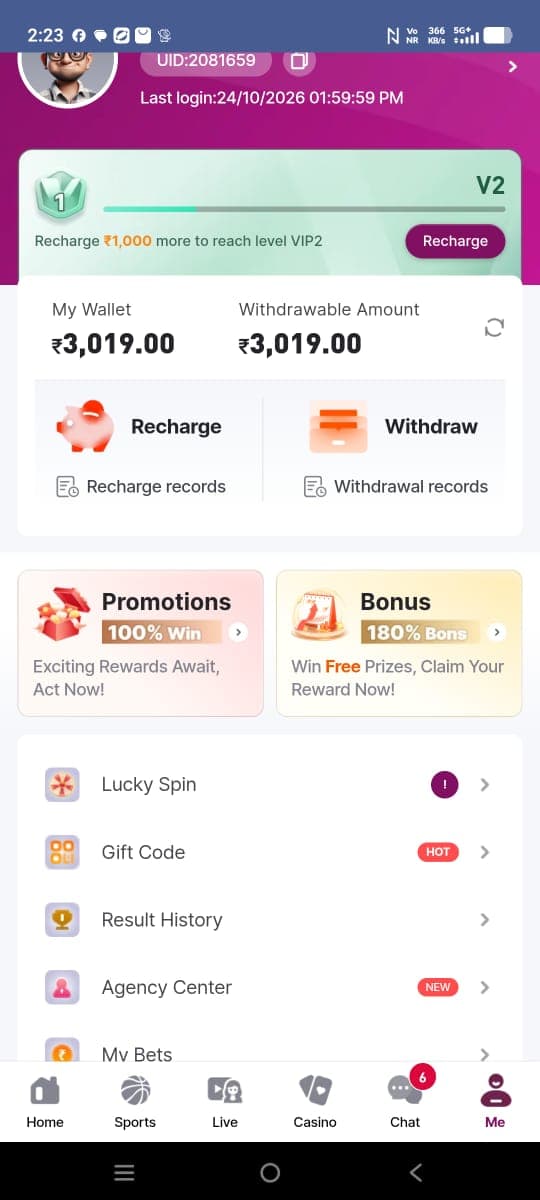
The supplied profile image is partially scrolled, but it shows an account identifier, a last-login timestamp, a level progress card, and a wallet summary. Beneath that are recharge and withdrawal entry points, transaction records, and promotional cards. Lower menu items include a lucky-spin label, gift code, result history, and agency center. This description records visible text and does not validate any associated feature.
Account identifiers and privacy
An account identifier can be personal data when it is linked to a person or account. Before sharing screenshots, consider obscuring IDs, balances, timestamps, and names. Never share passwords, one-time passcodes, recovery phrases, or payment credentials in a chat. A support representative should not need your one-time authentication code. Our privacy policy describes this editorial site’s own limited scope; it is not the privacy notice for the app pictured.
Chat list and support labels
The chat capture lists customer service, a prediction channel, an official channel label, and a sports prediction group. Visual badges and names cannot establish who controls a channel or whether a message is authentic. Verify contact details through a trusted, independently reached source. Be skeptical of unsolicited messages requesting payment, identity documents, credentials, or urgent action.
How to assess a support conversation
A careful support interaction should make the provider’s identity and issue process clear. Keep messages that relate to a complaint, record dates and reference numbers, and avoid sharing more information than necessary. If someone asks you to install an unfamiliar app or move to a private channel, stop and verify independently. The FAQ covers the limits of screenshot evidence, and the contact page is for feedback about this editorial guide only.
Profile shortcuts and account changes
Menu entries such as records, gift code, and profile settings can be useful navigational clues, but their names alone do not reveal their terms. Before changing account details or attempting a transaction, read the current instructions and check the provider’s official support materials. Keep account recovery options current and unique. Do not treat a screenshot of a menu as evidence that the associated process is available, reversible, or safe.
A note about wallet balances
The profile screenshot displays wallet figures and a recharge/withdrawal panel. Figures in a reference image are examples in a captured account state, not current rates, promises, or proof of a completed transaction. The screenshot gallery includes separate profile and withdrawal captures for comparison. If there is a dispute, preserve relevant records and use verified support or appropriate consumer channels.
Editorial conclusion
Use the material as a guide to visible interface patterns, then verify current details through primary, trusted sources. Images cannot establish current functionality, legal status, endorsement, or financial safety. For general site policies, read the disclaimer and editorial policy.